


Easy Piano Keyboard - Piano88
4.7640.00 Reviews
App Specs
- Version
- 10.1
- Updated On
- License
- Free
- Downloads
- 10,000,000+
- Developer
- Banix Studio
- Categories
- Music & Audio
- Platform
- Android, iOS
Screenshots
 Analysis by AppCompare
When I want a quick way to try a melody or tap out a chord without sitting down at a full-size instrument, a virtual keyboard is a handy place to start. Easy Piano Keyboard - Piano88 is a music app from Banix Studio built around that simple idea: open it on your phone and play. I see it as a casual, accessible piano companion, not a replacement for lessons or a physical keyboard. That distinction matters, because a touchscreen can make music feel easy to approach while still having limits when accuracy and technique become important.
A phone-sized instrument for unplanned moments
The app makes most sense in short sessions: trying a tune while waiting for someone, showing a child where notes sit, or checking whether a melody you have in mind sounds right. You do not have to plan a practice session or set up an instrument first. The trade-off is equally straightforward: playing on glass does not give your fingers the physical resistance or spacing of piano keys, so it is better for exploration and simple practice than for building performance technique.
I would recommend it most to curious beginners, casual players, and people who want an easy musical pastime. If you already play piano, it can still be useful for sketching an idea or practicing a short passage away from your instrument. But if your main goal is to learn proper hand position, develop consistent touch, or prepare a piece for performance, a real keyboard and structured instruction are stronger choices. A phone app can help you get started; it cannot provide the feel and feedback of playing an actual instrument.
What the current version tells me
Easy Piano Keyboard - Piano88 is free to install, is rated for Everyone, and runs on Android 6.0 or later. Its current version is 7.7, and the app has been available since June 25, 2024. Those details give readers a useful sense of its present place: it is an established mobile piano app rather than a newly appearing experiment, with a broad audience reflected in more than 10 million installs and an average rating of 4.7 from around 50,000 ratings.
That adoption is reassuring, but I would not treat popularity as proof that every feature will suit every player. The version number confirms the app has progressed through releases, yet it does not tell me which changes arrived in each one. I would judge it by how it works on my own device and by whether its on-screen layout suits my hands. Banix Studio’s app also includes optional in-app purchases, ranging from $1.49 to $19.99 per item, so I would explore the free experience before deciding whether anything paid is worthwhile.
How I would fit it into a real routine
Imagine you have ten minutes before a bus arrives and a tune from a film is stuck in your head. With a phone piano, you can tap out the contour of the melody, test a few notes, and save the idea in your memory without carrying extra gear. Later, you could sit at a proper keyboard and work out the fingering and rhythm more carefully. That is a realistic strength: the app can make a musical impulse easier to act on, even when you are nowhere near an instrument.
For a more deliberate session, I would use it in small, specific tasks rather than expecting it to teach everything at once. Pick a short phrase, repeat it slowly, and listen for whether the notes are in the order you intended. If you are using a recording option, playback can help you notice a missed note or uneven timing that you did not catch while tapping. That kind of self-check is more useful than simply playing the same passage over and over without listening back.
Worth Reading Before You Choose

Baby Panda World Brings Quick Play to Modern Phones, but Its Game Library Feels Busy

ESPN’s Live Game View Makes Following Close Games Easier

QuizzLand Review: A Good Fit for Short Trivia Breaks, Not Every Player

Basketball Stars: Multiplayer Is Fast, but Can It Recover When Matches Go Wrong?

WEBTOON Turns Phone Updates Into a Better Reading Routine

Link to Windows Runs on Shared Habits, Not Social Feeds
There is also a practical choice to make about screen size. A phone is convenient to carry, but a tablet can give your fingers more room to land on keys. Before settling into a longer session, adjust the keyboard so the visible range and key size feel manageable. If you find yourself stretching awkwardly or repeatedly hitting neighboring notes, treat that as a sign to change the layout or switch to a larger device, rather than assuming you need to play faster or harder.
Getting Started with the Keys
The first thing I noticed when I fired up Easy Piano Keyboard - Piano88 was how user-friendly it is. The interface is as intuitive as it gets, welcoming both beginners and seasoned players with open arms. You don't need to be a tech wizard to navigate through the options, and that's a big win in my book. I mean, who has time to fumble around with complicated settings when you're itching to play "Für Elise"?
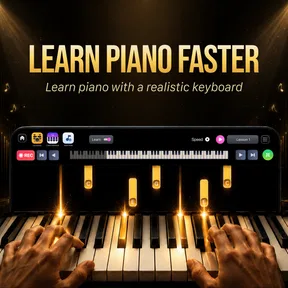
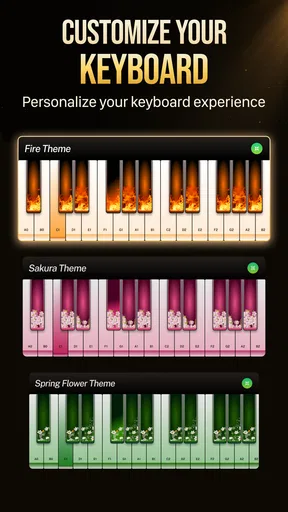
Right off the bat, the app offers a virtual keyboard that stretches across your screen. It's sleek and responsive, mimicking the feel of actual piano keys. What's more, it supports multi-touch, so you can unleash those complex chords without a hitch. For anyone who loves to tinker with settings, Piano88 provides options to adjust the size of the keys and the number of visible octaves. Nice touch, right?
Features That Hit the Right Chords
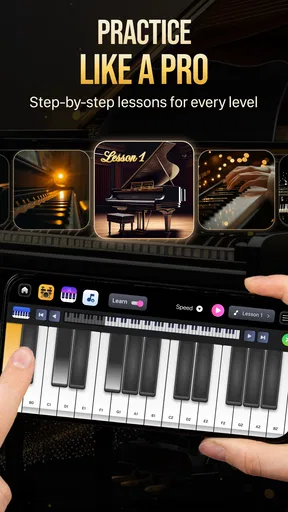
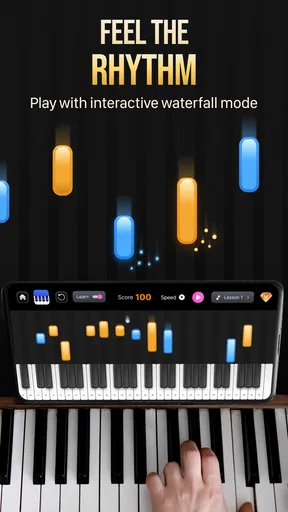
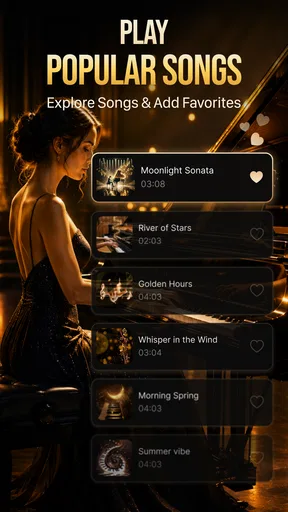
The features in this app are where things get really exciting. First up, there's a massive library of songs ranging from classical masterpieces to modern pop hits. You can choose your favorite tunes and start playing along. And don't worry if you're still learning; the app offers a step-by-step guide to help you nail those tricky parts. It's like having a personal piano teacher in your pocket!
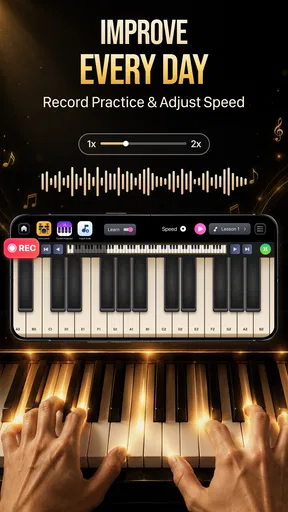
One feature I particularly loved is the recording option. You can record your sessions and play them back to hear how you're doing. It's a great way to track your progress and maybe even share your performances with friends. Plus, there's nothing like hearing yourself play without the pressure of an audience.
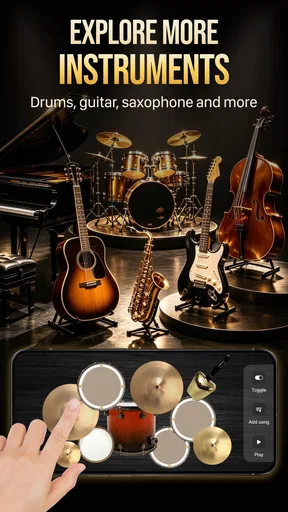
For those who like to experiment, the app also includes a variety of sound effects and instrument options. Ever wondered what "Twinkle Twinkle Little Star" would sound like on a harpsichord? Now you can find out!
Small-screen trade-offs and a fair comparison
Compared with a dedicated piano-learning app, Piano88 feels more like an instrument you can open immediately than a course that organizes a long-term curriculum. Its song guidance can give a beginner a starting point, but anyone who wants a planned progression should look for lessons that explain reading, rhythm, and technique in depth. Compared with a physical digital keyboard, the phone version is far easier to carry and needs no separate instrument, but the compact touch surface makes precise fingering and wide chords less comfortable.
It also occupies a different space from a general music player: listening is passive, while this app invites you to make the notes yourself. That is a real difference if you want a hands-on break, but it should not be confused with a full recording studio or a way to produce polished arrangements. I would choose it for quick experiments and casual playing, and choose a dedicated instrument or teaching tool when the goal is sustained musical progress.
Making the features work harder
A useful way to approach the song guide is to treat it as a prompt, not a substitute for understanding the music. Start with one short section, follow it until the note pattern feels familiar, then try again from memory. This small change makes the exercise more active: instead of only following cues, you are checking whether you can recall what comes next. If you get stuck, return to the guide and narrow the task to just a few notes.
Recording is most helpful when you give each playback a question to answer. Listen once for wrong notes, then again for whether the rhythm feels steady. Trying to judge everything at once can make a simple recording feel discouraging. A phone speaker is also not the ideal reference for judging a nuanced piano tone, so I would use playback mainly to check the notes and timing rather than to decide how a performance would sound in a room or through a proper instrument.
Instrument sounds can make practice more playful, especially for children or anyone who gets bored repeating the same tune. Still, changing the sound does not change the underlying challenge of placing notes accurately. I would use alternate timbres as a reward or a way to keep a short session fresh, then return to a piano sound when I want to focus on the melody itself. That keeps novelty from becoming a distraction.
Where the experience can fall short
While the app is mostly a hit, there are a couple of things that could be improved. Occasionally, the app may lag on older devices, especially if you're trying to play fast-paced songs with multiple touches. But for the most part, the performance is smooth, and it's nothing a quick app update couldn't fix.
Another thing to keep in mind is that while the free version offers plenty to play with, some of the best features are locked behind a paywall. If you're looking to access the full range of songs and advanced features, you might need to consider an in-app purchase. Still, the free version is a fantastic starting point.
Before paying, I would first identify what I actually want to do in the app. If the free selection already gives you enough material for occasional play, there may be no reason to spend anything. If you repeatedly reach for content or options that are restricted, then compare the particular purchase with how often you expect to use it. The presence of optional purchases does not mean every casual user needs them, and a beginner may learn more by practicing a small number of familiar tunes than by immediately seeking a larger collection.
For responsive playing, I would also keep the session modest on a device that feels slow. Short phrases and slower tempos are more forgiving than rapid runs that demand several taps at once. If a note seems late, try again with fewer simultaneous touches before concluding that the app or your timing is at fault. This is not a cure for device lag, but it helps separate a touchscreen limitation from a musical mistake.
Who should choose it—and what to watch
With a 4.7 average and roughly 482 written reviews, Easy Piano Keyboard - Piano88 has attracted plenty of attention, though individual experiences will still depend on a device and a player’s expectations. I would suggest trying the free version if you want an approachable way to tap melodies, explore keyboard notes, or entertain yourself with a small musical challenge. It is also a sensible option for parents who want a simple first encounter with piano sounds, provided they treat it as play rather than a complete course.
I would steer away from it as a primary tool if you need the feel of weighted keys, detailed feedback on technique, or a carefully paced program that takes you from beginner to advanced playing. Those needs call for a real keyboard, a teacher, or a specialist learning platform. A touchscreen app can be a useful companion alongside those options, but the distinction prevents disappointment: convenience is its strongest advantage, not physical realism.
As you decide whether it deserves space on your phone, pay attention to how comfortable the keyboard feels after a few minutes, whether the song guidance keeps you engaged, and whether recording helps you hear something specific to improve. Those are better indicators of a good fit than the number of available sounds alone. Also keep an eye on future version changes if you rely on a particular workflow; the current version is 7.7, but I would wait for clearly described improvements rather than assume a new release will solve a limitation that matters to you.
Why You Should Give It a Try
If you're itching to dive into the world of piano, Easy Piano Keyboard - Piano88 is definitely worth your attention. It's a versatile app that's perfect for anyone looking to learn piano or just have some musical fun. With its user-friendly design, diverse features, and huge song library, it provides endless hours of entertainment and learning. Whether you're a budding musician or just looking to tinkle the ivories for fun, this app is a great companion.
So, grab your phone or tablet, and let Easy Piano Keyboard - Piano88 be your guide on this musical journey. Who knows? You might just discover your inner Mozart!
My take after weighing the trade-offs
I would start with the free experience and use it for a few short sessions before deciding whether it fits my routine. Try a familiar melody, change the keyboard layout if reaching the notes feels cramped, and listen to a recording with one clear goal in mind. If those simple steps make you want to keep playing, the app is doing its job. If you find yourself wishing for more realistic key response or structured teaching, that is useful information too: it means your next step is probably a physical keyboard or a more lesson-focused app.
For me, the appeal is the low-friction invitation to make music wherever I happen to be. It turns spare minutes into an opportunity to experiment, while its limits are easy to understand once I stop expecting a phone screen to behave like a piano. With that expectation set, it is an enjoyable option for casual playing and a practical first touchpoint for curious beginners.
Pros
- User-friendly interface
- easy to navigate
- Wide range of songs to practice with
- High-quality sound output
- Customizable keyboard layout
- Responsive touch sensitivity
Cons
- Limited free song selection
- In-app ads can be distracting
- Requires internet for updates
- Some features locked behind paywall
- Occasional lag on older devices
FAQs for Easy Piano Keyboard - Piano88
What features does Easy Piano Keyboard - Piano88 offer?
Easy Piano Keyboard - Piano88 provides a wide range of features, including realistic piano sounds, multiple instrument options, and a variety of keyboard layouts. It also offers a learning mode with tutorials and sheet music, making it suitable for beginners and experienced players alike. Additionally, the app includes recording capabilities for tracking your progress.
Is Easy Piano Keyboard - Piano88 suitable for beginners?
Yes, Easy Piano Keyboard - Piano88 is designed to cater to all skill levels. For beginners, it offers step-by-step tutorials and an interactive learning mode to help users understand the basics of piano playing. The app simplifies learning with easy-to-follow instructions and visual aids, making it an excellent choice for new learners.
Does Easy Piano Keyboard - Piano88 require an internet connection?
Easy Piano Keyboard - Piano88 can operate offline for basic piano playing and accessing downloaded content. However, an internet connection may be required for accessing additional features such as online tutorials, updates, and downloading new sheet music or sound packs. This makes the app versatile for both online and offline use.
Are there any in-app purchases within Easy Piano Keyboard - Piano88?
While Easy Piano Keyboard - Piano88 offers a variety of free features, there are in-app purchases available for users who wish to expand their experience. These can include additional instruments, exclusive tutorials, and premium sheet music. Users can enjoy the app fully without purchases, but these options are available for enhanced functionality.
What platforms support Easy Piano Keyboard - Piano88?
Easy Piano Keyboard - Piano88 is available for both Android and iOS devices, ensuring compatibility with a wide range of smartphones and tablets. Users can download the app from the Google Play Store or Apple App Store. The app is optimized to run smoothly on different devices, providing a seamless piano experience.


